SMB Wi‑Fi Analyzer · macOS
Check SMB upload & download speed on your Mac.
SMB Wi‑Fi Analyzer (Speedtest) lets you measure how fast files move between your Mac and a NAS or file server. Watch live read/write speed, peaks and averages in one compact window.

No tracking, no accounts — tests stay on your Mac.
Live SMB speed
What the app does
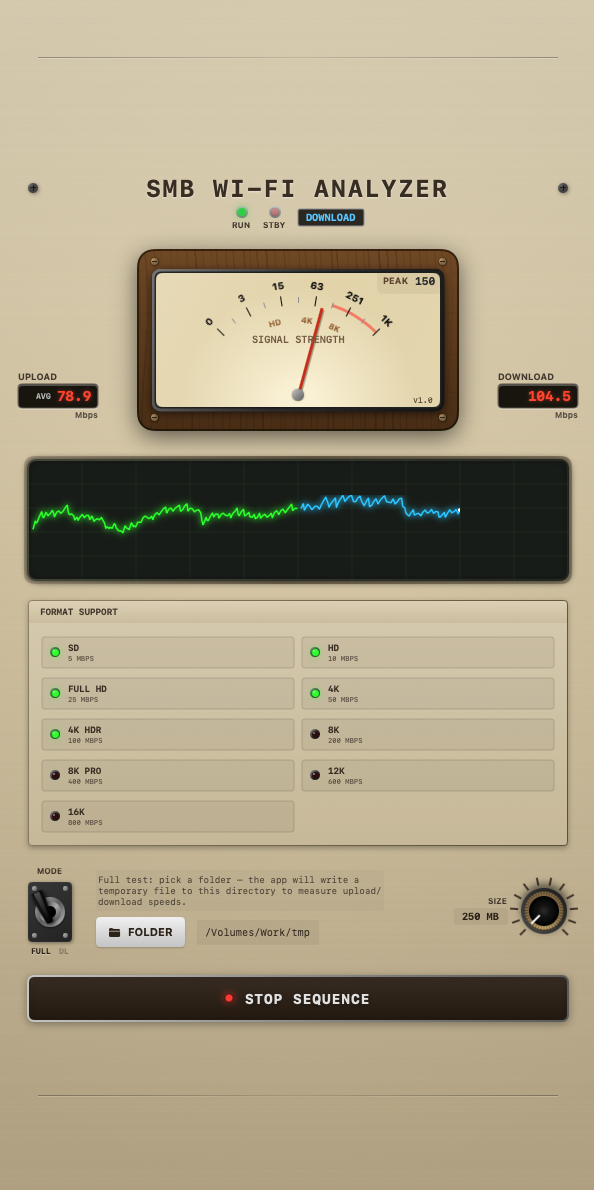
- Measure read speed of a selected remote file (Download‑only mode).
- Measure write and read speed using a temporary test file in a folder you choose (Full test mode).
- See current, peak and average throughput as numbers, a tachometer and a simple graph.
- Adjust test file size and stop any time — temporary files are removed automatically.
How it works
Getting started takes just a few clicks:
Designed for real networks
- Works with SMB shares on NAS devices and file servers.
- Ideal for comparing Wi‑Fi vs. Ethernet performance.
- All tests run locally on your Mac; no results are sent anywhere.